
Next Match

Hull City (A)

Men's First Team

Renew your seat for next season and enjoy a premium matchday experience in one of our spacious, modern lounges.

Expect more high-quality food, themed menus and guest chefs on select matchdays throughout the season, and continue to watch Brentford with some of the best views of the pitch available at the Gtech.

For full information about your renewal, please refer to your email from the club containing your seat details.

Access your lounge renewal portal below:

The Legends

The Railway

The Orchard

Renewing your season ticket

To be a premium seat holder at Brentford, you need a season ticket and a lifetime premium seat licence.

All fans will have received an email for the club about their renewal and the actions they need to take.

Season ticket renewals

  • All premium seat holders will receive an email to say that renewals are now open. Please follow the steps on this email to purchase your 2026/27 season ticket.

  • This can be paid in one payment or monthly via direct debit.

  • Season tickets will now be renewed annually.

  • When you purchase, you can choose to opt in to auto-renewal, and your season ticket will automatically renew each season. You can opt out of auto-renewal at any time.

Securing a lifetime premium seat licence

  • All fans in premium areas will now need a lifetime premium seat licence. All short-term licences are set to expire in June 2026.

  • If you are already on a lifetime licence, you only need to renew your season ticket.

  • Fans who are on short-term licences will have received information about upgrading to the lifetime licence. You will need to secure your lifetime licence before renewing your season ticket.

Premium Seat Renewals Infographic

Upgrading to a lifetime licence

If you’re upgrading from a short-term to a lifetime licence, you will only be charged the difference between what you paid for a short-term licence and the cost of a lifetime licence. This will be charged as a single payment.

To upgrade to a lifetime licence and renew your season ticket, please contact the premium services team via [email protected] or call 020 8380 9930.

Helping you manage your season ticket payments

We encourage all fans to take advantage of the following initiatives.

Interest-free monthly direct debit payments 

  • You can pay for your season ticket in monthly interest-free instalments over a 12-month period for more manageable payments. The option to make a single, up-front payment remains, and you will have the choice between the two methods when you renew.  

  • Please note that direct debit payments are only available for your season ticket, and not for your lifetime licence. 

Pro-rata credit reimbursement   

  • If you can’t make a Premier League game, list your ticket on the exchange at least seven days before the fixture and you will receive credit worth 1/19th of the cost of your season ticket into your account.

  • If you list your ticket within seven days of the fixture, you will only receive credit if the ticket sells. 

Credit cashback 

  • Any ticketing credit accumulated in your account can be withdrawn into your bank account twice per season. We will contact fans around Christmas and the end of the season with details on how to do this.

KEY DATES

26/27 PSH Renewals - Key Dates Asset
  • Wednesday 11 March, 2pm – premium seat renewal window and licence upgrade window opens

  • Wednesday 11 March, 2pm – seat move and additional seat request window opens

  • Friday 10 April, 5pm– premium seat renewal and license upgrade window closes

  • Friday 10 April, 5pm – deadline to submit seat move and additional seat requests

  • w/c 13 April – seat moves by appointment

  • Wednesday 1 July – first direct debit for the 2026/27 season for premium seat holders paying via this method

How to renew

  • You only need to renew your season ticket for the 2026/27 season. You will have received a premium seat renewal email containing a link to your renewal portal and step-by-step instructions on how to renew.

  • You must first upgrade to a lifetime licence before renewing your season ticket for the 2026/27 season. You will have received an email with details and instructions on how to upgrade to a lifetime licence.

  • Once your upgrade is complete, you will receive an email with your details and instructions on how to renew your season ticket for next season.

Step 1.

  • Head to eticketing.co.uk/brentfordfc and log in by pressing the profile icon in the top right corner.

  • Once logged in, select the ‘Renew Now’ button in the bottom-right corner of the webpage to access your renewals page.

2026/27 renewals: Step 1. Head to the renewals page
  • Alternatively, you can access the renewals page via your account hub by pressing the account icon and selecting renew now under your notifications.

2026/27 renewals: Step 2 Head to renewals alternative journey

Step 2.

  • On the season ticket renewals page, you will see your season ticket and any other tickets you manage on behalf of friends and family. Tick the box beside the season ticket(s) you want to renew, then select add to basket.

2026/26 Renewals: Add to basket page

Step 3.

  • In your basket, you have the option to automatically opt in to auto-renewal for the 2027/28 season. We will notify you ahead of the 2027/28 season. (See how to opt in to auto-renewals for more information).

  • Select a payment method. You have the choice of paying the full price for your season ticket up front or paying with interest-free direct debit instalments over the course of 12 months.

    • Please note that if you opt in to auto-renewal, you cannot use your ticketing credit when paying online.

  • If you want to pay up front for one season ticket and pay by direct debit for another ticket you manage, you can do this by renewing the season tickets separately (i.e. selecting only one ticket at a time at Step 2).

  • Enter your card details and select review order.

2026/27 season ticket renewal: Step 4 Payment method

Step 4.

  • Review your order, read and acknowledge the terms and conditions, and select complete purchase.


Congratulations! You have successfully renewed your season ticket for the 2026/27 season.

To renew season tickets on behalf of your Friends & Family members, you must be managing their account. More information on assigning permissions to Friends and Family accounts can be found here.


Step 1.

  • Head to eticketing.co.uk/brentfordfc and log in by pressing the profile icon in the top right corner.

  • Once logged in, select the ‘Renew Now’ button in the bottom-right corner of the webpage to access your renewals page.

2026/27 renewals: Step 1. Head to the renewals page
  • Alternatively, you can access the renewals page via your account hub by pressing the account icon and selecting renew now under your notifications.

2026/27 renewals: Step 2 Head to renewals alternative journey

Step 2.

  • On the season ticket renewals page, you will see your season ticket and any other tickets you manage on behalf of friends and family. Tick the box beside the season ticket(s) belonging to your friends and family, then click add to basket.

2026/26 Renewals: Add to basket page

Step 3.

  • Select a payment method. You have the choice of paying the full price for your season ticket up front or paying with interest-free direct debit instalments over the course of 12 months.

  • If you want to pay up front for one season ticket, and pay by direct debit for another ticket you manage, you can do this by renewing the season tickets separately (i.e. selecting only one ticket at a time at Step 2).

  • Enter your card details and select review order.

2026/27 season ticket renewal: Step 4 Payment method

Step 4.

  • Review your order, read and acknowledge the terms and conditions, and select complete purchase.


Congratulations! You have successfully renewed your season ticket(s) for the 2026/27 season.

Step 1.

  • Head to eticketing.co.uk/brentfordfc and log in by pressing the profile icon in the top right corner.

  • Once logged in, select the ‘Renew Now’ button in the bottom-right corner of the webpage to access your renewals page.

2026/27 renewals: Step 1. Head to the renewals page
  • Alternatively, you can access the renewals page via your account hub by pressing the account icon and selecting renew now under your notifications.

2026/27 renewals: Step 2 Head to renewals alternative journey

Step 2.

  • On the season ticket renewals page, you will see your season ticket and any other tickets you manage on behalf of friends and family. Tick the box beside the season ticket(s) you want to renew, then select

    add to basket

2026/26 Renewals: Add to basket page

Step 3.

  • In your basket, you have the option to automatically opt in for auto-renewal for the 2027/28 season.

  • Select the tick box to opt in. This will automatically opt in all season tickets currently selected in your basket.

  • We will notify you ahead of the 2027/28 renewal period in case you've changed your mind and no longer wish to renew your season ticket.

  • Please note, if you choose auto-renewal, ticketing credit cannot be used when paying online.

2026/27 Renewals: Opt-in checkbox

Step 4.

  • Select a payment method. You have the choice of paying the full price for your season ticket up front or paying with interest-free direct debit instalments over the course of 12 months.

  • If you want to pay up front for one season ticket and pay by direct debit for another ticket you manage, you can do this by renewing the season tickets separately (i.e. selecting only one ticket at a time at Step 2).

  • Enter your card details and select review order.


Step 5.

  • Review your order, read and acknowledge the terms and conditions, and select complete purchase.


Congratulations! You have successfully renewed your season ticket for the 2026/27 season.

Step 1

  • Log in to your Brentford FC ticketing account at eticketing.co.uk/brentfordfc and select the profile icon in the top right corner.


Step 2.

  • Navigate to the Season Ticket Auto-Renewal Status page by selecting:

    • View account menu

    • Ticketing

    • Season ticket auto-renewal status


Step 3.

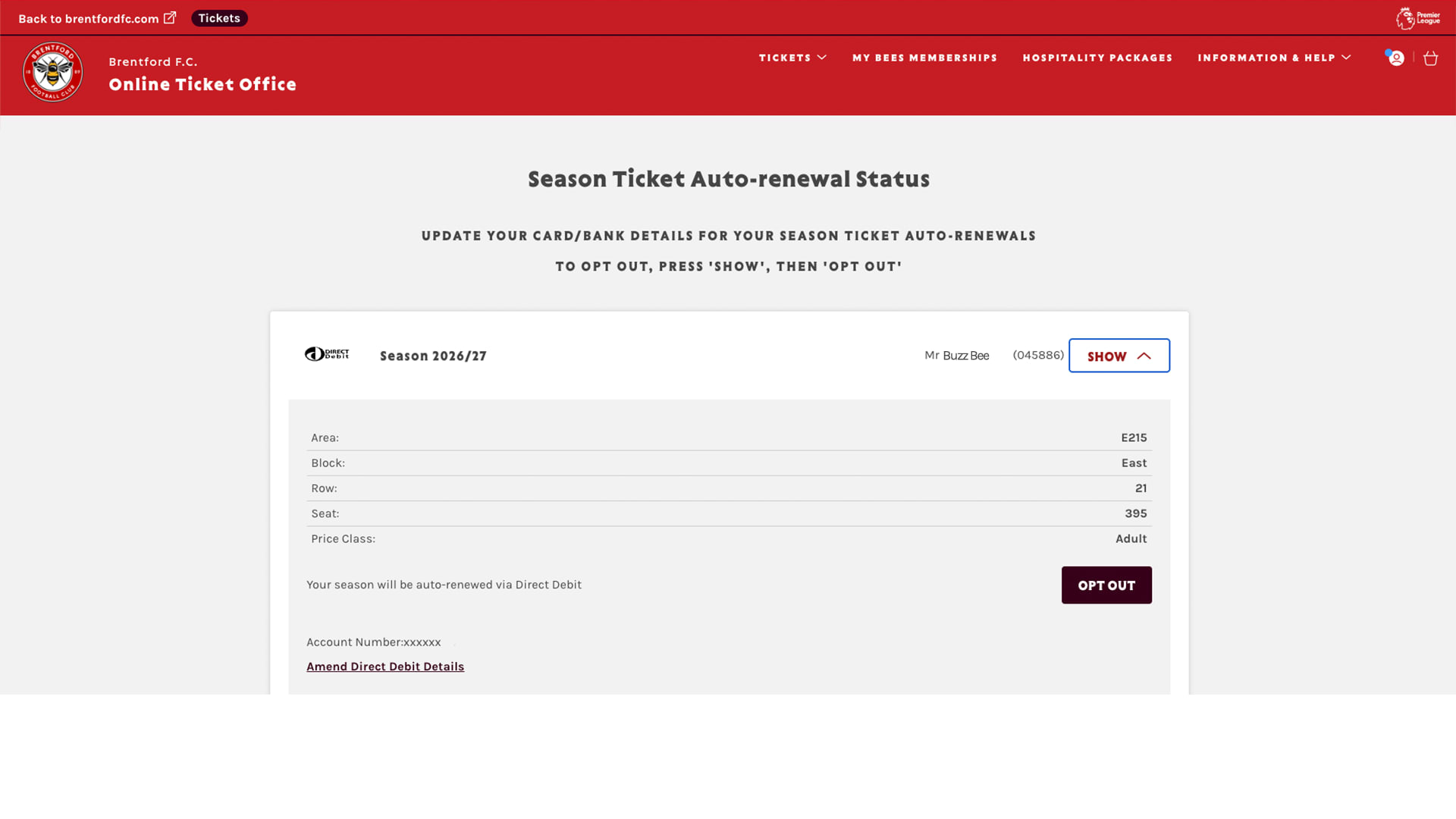
  • You will see all season tickets currently opted in to auto-renewal. Select show, then choose opt out.

2026/27 renewals: Season ticket auto-renewal status

Step 1.

Log onto your account at www.eticketing.co.uk/brentfordfc


Step 2.

When logged in, click on the account icon and head to your account history by selecting: view account menu > account management > account history.


Step 3.

Here you will be able to see all your online, call centre and box office activities. Locate your season ticket by the date of purchase/renewal. (You can filter by history type - select purchase history.)

2026/27 renewals: View payment

FAQs

  • Premium seats can be purchased in one payment online, by phone (020 8380 9930) and in person. If you're renewing your season ticket online, log in to your ticketing account first.

  • Please note that if you do not opt in to auto-renewal, you can use your ticketing credit when paying online.

  • Payments will be taken on or around the first day of each month. The first payment will be taken on 1 July 2026 followed by a further eleven monthly payments until June 2027.

  • Our direct debit option is interest free.

  • Please note that if you do not opt in to auto-renewal, you can use your ticketing credit when paying online.

  • If you have any questions about direct debits or if you haven’t received confirmation of your payment terms via email by Friday 12 June, please contact our team via email at [email protected] or phone 020 8380 9930.

  • Yes, but only if you do not opt in to auto-renewal. You can select the option to use your ticketing credit when paying online.

  • You can pay in full using ticketing credit if you have enough credit in your account.

  • You can also use ticketing credit as part payment and pay the remaining balance by card or direct debit.

  • If you opt in to auto-renewal, you will not be able to use your account credit towards your season ticket payment.

  • If you don’t use your ticket credit for your season ticket renewal, your balance will be carried forward and can be used for other ticketing purchases in the future, including for away and cup games.

  • At checkout, you will have the option to opt in to automatic renewal for the 2027/28 season. If selected, you will be notified of your season ticket price next season, and payment will be taken automatically using your saved payment method. We will contact you in advance of the 2027/28 renewal window with further details.

  • You have the option to opt-in to autorenewals during the purchase journey.

  • For guidance on how to opt in to autorenewals, please view our how-to guides.

  • You have the option to opt-in to autorenewals during the purchase journey.

  • For guidance on how to opt out of autorenewals, please visit our how-to guides.

  • To purchase a premium seat at Gtech Community Stadium, you need to have a premium lifetime licence.

  • Previously, the club has sold short-term licences and lifetime licences. At the end of this season, all short-term licences are due to expire and moving forward, the club will only sell lifetime licences.

  • Fans on a short-term licence have already been informed that they will need to upgrade to a lifetime licence. To upgrade, you will only be charged the difference between the cost of a short-term licence and a lifetime licence

  • Fans becoming a premium seat holder for the first time will need to pay the full lifetime licence fee.

  • Ahead of the move to Gtech Community Stadium, we offered fixed-term licences to give supporters the opportunity to experience the new facilities before committing to a premium package.

  • Moving all fans to lifetime licenses creates a more uniform and consistent experience for all our premium guests.

  • In the first instance, you can look to transfer your licence to a friend or family member.

  • If you do not have someone you know who wishes to take on your licence, we do consider buy-backs. Each case is assessed individually according to the terms of the licence agreement. We will always approach such discussions positively, factoring in the current demand and timings. However, the club is not under any obligation to agree to a buy-back.

  • Yes. The terms and conditions of the agreement mean that the licence would be terminated. If you are considering taking some time away, please contact the premium services team by phone on 020 8380 9930 or by email at [email protected].

  • You will initially receive a confirmation email from Ticketmaster and will be able to view your seat in your ticketing account.

  • You will also receive a confirmation email from the club containing renewal information and next steps.

  • Premium season tickets will now be renewed on an annual basis.

2026/27 PSH renewal FAQs - Licence and transferring guidelines

  • Yes, as per the terms and conditions of the licence and subject to club approval. The seller must agree the price with the buyer directly.

  • An administration fee of £100 plus £50 per seat applies. This works out as £150 for one seat, £200 for two seats, £250 for three seats, and so on.

  • The buyer must then purchase a premium seat season ticket directly from the club.

  • You should contact the Premium Services team first. They will ask you to complete a form and provide details of the proposed buyer, which is required under the terms and conditions.

  • Subject to the club’s approval, all parties will then sign the necessary paperwork. The seller and the buyer must agree and arrange the payment directly.

  • The buyer must then take over the payment arrangements at an agreed date.

  • No, but the club needs to approve the transfer of a licence to the nominated buyer. The new buyer will not acquire any of the seller’s TAPs as part of the transfer.

  • The seller will retain their TAPs. TAPs are linked to the individual and not the seat.

  • Your termination rights are detailed in your licence agreement. You should contact the premium services team to discuss.

  • The seller must initiate the sale by contacting the premium services team.

  • As per the terms and conditions of the licence, you are able to bequeath it to another person as part of their estate via their will. Alternatively, speak to us directly by contacting the premium services team.

  • A lifetime licence will expire in the summer of 2071 or if the club moves from Gtech Community Stadium.

  • From the 2026/27 season, premium lounge access will open two hours before kick-off.

  • The new lounge opening time starts from the first pre-season friendly of the 2026/27 season onwards.

  • Post-match lounge access is one hour after full-time.

  • You will find lounge opening times in your premium pre-match email communications and on your matchday itinerary for each fixture.

2026/27 PSH renewal FAQs - MOVING AREAS IN THE GTECH 

  • Yes. You may request a seat move, but there is no guarantee that a better seat will be available. If you would like to request a seat move, please complete the seat move form here.

  • If you have any questions regarding a seat move within our premium lounges, please contact the premium services team by phone on 020 8380 9930 or by email at [email protected].

  • Yes, premium seat holders can move to a general admission area of the stadium, if there is availability.

  • If you’re certain you want to move out of premium areas, don’t renew your current premium season ticket and complete our seat moves request form here. However, please not that alternative seats are subject to availability and if you don’t renew your seat and then change your mind we cannot guarantee that your orignal seat(s) will still be available.

  • If you’re unsure if you want to move, or would like to see what’s available, we recommend that you renew your current premium season ticket so that your seat is secured for next season. Then, complete the seat move request form here.

  • If you renew your premium seat but move to general admission, your account balance will be adjusted accordingly and any overpayments will be refunded.

  • Yes, if there is availability. Season ticket holders should detail their request via this form. We recommend season ticket holders to first renew their season ticket to avoid the risk of losing their existing seat.

2026/27 PSH renewal FAQs - Docusign - upgrading to a lifetime licence

  • DocuSign is a document signing software enabling you to sign your lifetime licence agreement online.

  • The DocuSign you will receive will look like the below.

DocuSign Image 1

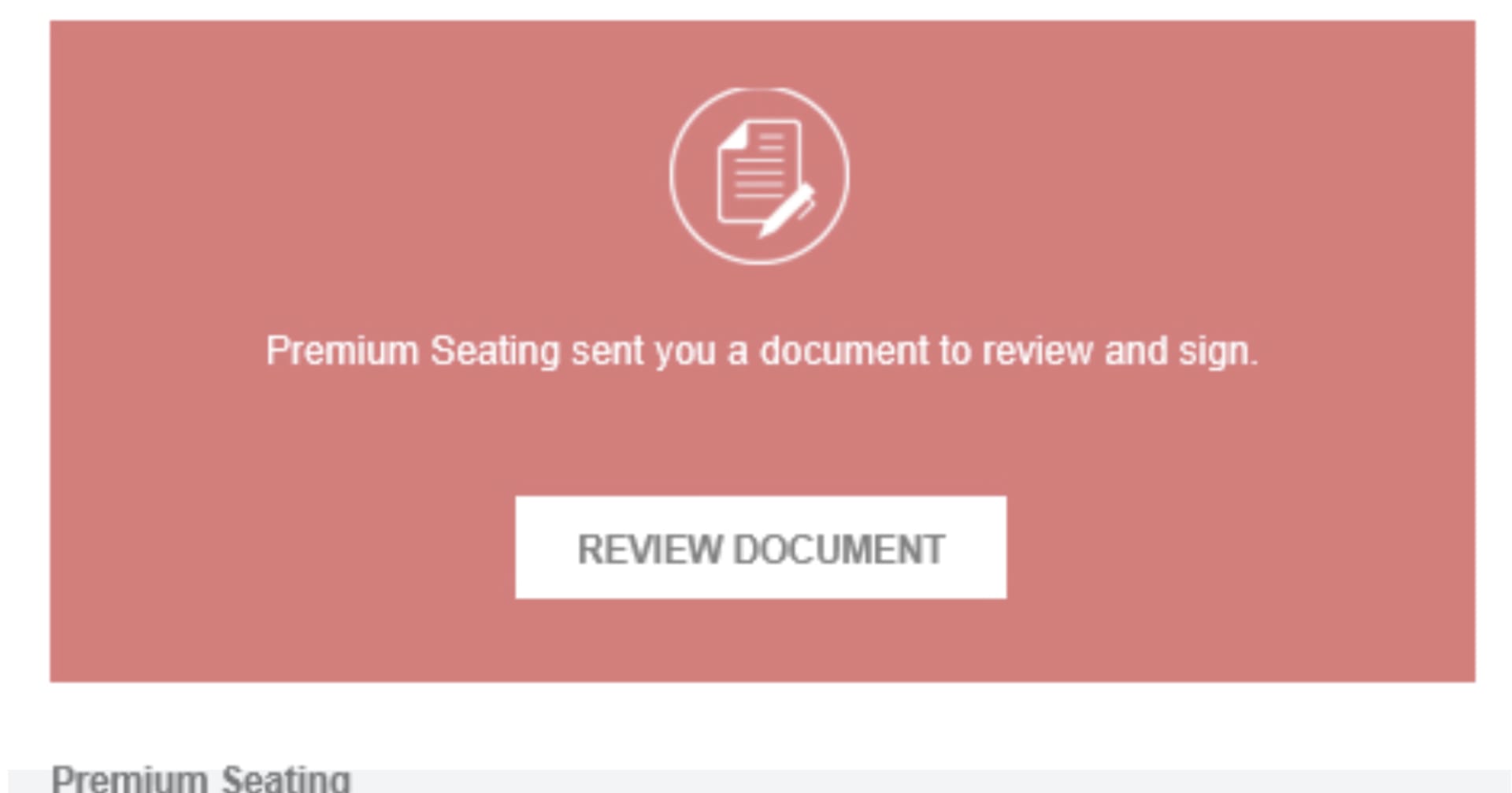
  • In the header of the email you’ll receive from DocuSign it will say ‘Premium Seating sent you a document to review and sign' as shown below.

DocuSign Image 2

  • If you are a premium seat holder with a limited term licence and a season ticket ending in 2026 and haven't received an agreement via DocuSign, please check your spam or junk folder. If you still haven’t received the agreement via DocuSign please contact the premium services team by phone on 020 8380 9930 or by email at [email protected].

  • If you are a premium seat holder with a lifetime licence and a season ticket ending in 2026, you will not receive a DocuSign and do not need to take any action.

  • If you have any queries or issues signing your agreement via the DocuSign email, please contact the premium services team by phone on 020 8380 9930 or by email at [email protected].

  • You will receive a confirmation email from DocuSign to confirm that you have signed your agreement.

  • If you believe that you have signed the agreement correctly and you have not received the confirmation from DocuSign, please contact the premium services team by phone on 020 8380 9930 or by email at [email protected].

  • You will find a copy of your signed agreement attached to the confirmation email after signing. You can download a copy and save it to your computer.